
Search Console & AI Overviews
I Turned On Google's Search Generative AI Report on a Small Site. Here's What the Data Actually Showed
I checked Google's new generative AI report in Search Console on a small site. Here's what it shows, what it hides, and how to read it without fooling yourself.
Key takeaways
- The report counts impressions only - clicks and queries from AI Overviews and AI Mode are lumped into standard web search.
- On SEOWebGrow, 92 days of tracking showed 186 AI impressions across 44 active days, alongside 923 GA4 sessions (69% classic Google organic).
- One impression is counted per AI answer even if multiple links appear; final URLs are tracked post-redirect.
- Opting out removes AI Overviews and AI Mode visibility and may remove sites from Top Stories carousels rendered inside AI surfaces.
- Publishing an llms.txt file has zero effect on Google AI Overviews impressions, though it serves autonomous agentic browsing.
The short answer
The obvious question when Google's generative AI report arrived was: "is AI Overviews stealing my traffic?"
The report can't answer that. What it gives you is smaller but more useful. Here is what I found on SEOWebGrow (seowebgrow.com), a small site where I build free technical SEO and GEO tools, and how you can run the same check in about 20 minutes.
- The report counts impressions only. It shows how often your links appeared in AI Overviews and AI Mode, broken down by pages, countries, devices (Search only), and dates. There is no query data.
- There are no clicks in it. Clicks from AI Overviews and AI Mode are counted in the normal Performance report, mixed in with all other web clicks.
- The opt-out toggle works at the domain/property level and, per Google, is not a ranking signal for standard search. But it may also remove you from Top Stories shown inside AI Overviews.
- The most useful workflow: pair the AI report's Pages tab with the classic Performance report.
- On my small site the report showed 186 AI impressions in 92 days, while Analytics recorded 923 sessions from July 1 to October 23, about 69% of them from regular Google organic. That is real, but it is far too small to draw firm conclusions from, and I explain how to treat numbers like that below.
Treat early AI impression metrics as directional visibility signals, not traffic drivers. Pair the data with standard GSC reports to understand user behavior.
What Google launched, in plain words
On June 3, 2026, Google added a "Generative AI features" performance report (Beta) to Search Console, with separate views for Search (AI Overviews and AI Mode) and Discover. It began with a subset of UK sites. By August 31, 2026, Google said the reports were available to all websites worldwide.
Where to find it: open Performance in Search Console and look for Generative AI in the left menu. Discover has its own entry underneath. If the entry is missing, one guide suggests appending /ai to your Performance report URL.
Note on the opt-out toggle: the August 31 rollout announcement covers the reports. Coverage of it does not clearly describe the toggle, so check Settings in your own account to see whether you have it.
What I did
To audit our actual AI visibility without jumping to conclusions, I ran a strict three-step export across our properties:
Export Generative AI Performance
Opened Performance → Generative AI and set the date range to July 21 to October 20, 2026, the longest window my export covered, exporting the daily impressions chart for the whole site.
Export Google Analytics 4 Baseline
Pulled a Google Analytics 4 snapshot for the whole site (July 1 to October 23, 2026) to see what the AI numbers look like next to real visits.
Cross-Reference Without Double Counting
Remember: AI impressions are already included in the Web search type of the classic Performance report. You cannot add the two reports together without double-counting.
Never add Generative AI impressions to standard Search Console impressions; AI impressions are already a subset of total web search impressions.
What my data showed
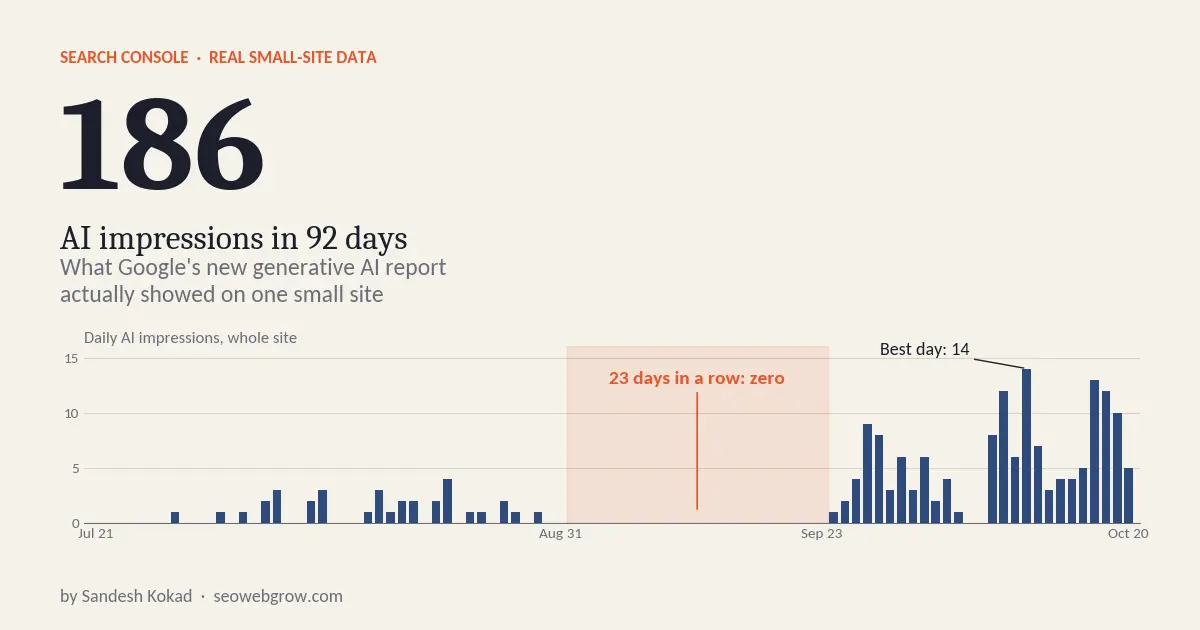
Here is the honest picture from the report's chart export for seowebgrow.com, covering July 21 to October 20, 2026 (92 days):
| Period | AI impressions | Observations |
|---|---|---|
| Jul 21 – Aug 31 | 34 | Initial rollout period, modest sporadic appearances |
| Sep 1 – Sep 23 | 0 | Flatline window for 23 consecutive days |
| Sep 24 – Oct 5 | 49 | First sustained climb in impressions |
| Oct 8 – Oct 20 | 103 | Strongest stretch; best single day (Oct 11) with 14 impressions |
| Total (Jul 21 – Oct 20) | 186 | Average ~2/day; appeared on 44 of 92 days |
- Total AI impressions: 186 across the whole site in 92 days. That is an average of about 2 a day, and impressions showed up on only 44 of the 92 days.
- It was very uneven. The July 21 to August 31 stretch added up to 34. Then September 1 to 23 was zero for 23 days in a row. Since September 24 the numbers climbed: 49 impressions from September 24 to October 5, and 103 from October 8 to October 20.
- Best day: October 11, with 14 impressions. The last two weeks were the strongest of the whole period.
- Last 7 days vs. the 7 before: 53 vs. 50, so roughly flat after the climb.
- What I can say: My site shows up in Google's AI features a little, and noticeably more lately than at the start.
- What I can't say: I can't say why September was empty. It could be a real drop in visibility, a gap in the data, or simply too few searches to register. The report doesn't explain it.
- I can't say these 186 impressions led to any visits, because the report provides no click data.
- With numbers this small, one page getting pulled into one popular query can move a whole week. Please don't read a permanent trend into a single spike.
A big-site case study would show you tidy percentages. A small site shows you noise, and the correct response is to track slowly and avoid over-reacting.
What my Google Analytics showed, to put the 186 in context
Search Console tells you about appearances. Analytics tells you about visits. I pulled a GA4 snapshot for the whole site from July 1 to October 23, 2026 to see the bigger picture. These are two different tools with different date windows, so treat this as context, not a direct match-up.
| GA4 metric (Jul 1 – Oct 23, 2026) | Value | Context |
|---|---|---|
| Active users | 697 | Total unique visitors during reporting window |
| New users | 690 | 99% first-time visitors for young domain |
| Sessions | 923 | Total browsing sessions recorded |
| Average engagement time per active user | about 80 seconds | Strong engagement on interactive developer tools |
| Key events | 0 | No conversion goals currently configured |
| Source / medium | Sessions | Share of 923 | Channel Type |
|---|---|---|---|
| google / organic | 638 | about 69% | Search Engine Organic |
| (direct) / (none) | 256 | about 28% | Direct Visitors |
| search.google.com / referral | 12 | about 1.3% | Google Search Referral |
| in.search.yahoo.com / referral | 7 | under 1% | Yahoo Search Referral |
| facebook.com / referral | 4 | under 1% | Social Referral |
| bing / organic | 2 | under 1% | Search Engine Organic |
| l.facebook.com / referral | 1 | under 1% | Social Referral |
| perplexity.ai / ai-assistant | 1 | about 0.1% | AI Engine Referral |
- Google organic is the engine. About 7 in 10 visits came from regular Google search. A small site lives or dies on ordinary organic visibility.
- Almost no visits are labelled as AI. The only source GA4 tagged as an AI assistant was Perplexity, with a single session. I saw no sessions labelled ChatGPT, Gemini, or Claude in this snapshot.
- That does not mean AI sends me nothing. Google's AI Overviews and AI Mode clicks are not separated in standard reports; they are counted inside regular Google search traffic. So I can't say how many of my 638 organic sessions came through an AI feature, and neither can you from these reports.
- Almost every user was new. 690 of 697 active users were new, so I have very little returning traffic yet. That is normal for a young site, but it also means I can't judge loyalty.
- Zero key events. The tools are free and I haven't set up conversion tracking around them, so Analytics can't tell me whether any of these visits were valuable. I'm flagging this as a gap in my own setup.
186 AI impressions against 923 total sessions shows that AI-feature visibility is a small, early slice of a site whose traffic is still overwhelmingly classic Google organic.
A page built to answer directly: my llms.txt Generator
The page I'd point to as my most deliberate attempt at answer-first writing is the Free llms.txt Generator. It is a tool page with a worked example of a valid file, a spec explainer, a comparison table, and a 7-question FAQ. I don't have page-level AI impressions to quote for it in this post, so I can't claim it performs better or worse than any other page.
Here is what I deliberately built into that page. These are choices I made, not proven causes of anything in the report:
- A direct answer near the top. A one-paragraph definition of an llms.txt file sits right under the tool box.
- A concrete example people can copy. A full sample
llms.txtwith a title, summary, sections, and descriptive links. - Specific, checkable details. For example, the three things Lighthouse 13.3's Agentic Browsing audit checks: the file starts with an H1, uses valid Markdown links, and is at least 50 characters long.
- Newer information. A section on the August 2026 llms.txt v2 changes, with copy-paste snippets.
- Honest limits. The page says plainly that Google does not use llms.txt for ranking and that studies found no link to AI citations.
Designing for answer engine discovery means offering immediate utility above the fold, verified code snippets, and transparent technical constraints.
Two counting rules that change how you read the numbers
These counting rules are easy to miss, and they matter on a small site where every single number counts:
- One impression per AI answer. If two of your pages appear in the same AI answer, the chart counts one impression. Impressions don't equal total links shown.
- Final URL after redirects. The Pages tab uses the final URL. If you migrated URLs recently, check the redirect target, not the old address.
- Impression thresholds apply. A missing site isn't always a bug. The most common reason is not having enough impressions in AI features yet. Also check Settings → Search generative AI in case your site was excluded.
Do not confuse impressions with citation links. Multiple links inside one AI Overview count as a single impression.
The "cited but not clicked" check
This is the check I'd repeat monthly to identify optimization opportunities:
Identify Top AI Pages
Take your top 10 pages by AI impressions from the Generative AI report export.
Cross-Reference Classic Search Performance
Look up each one in the classic Search Console Performance report for the exact same date range.
Analyze Query & CTR Discrepancies
Compare impressions to clicks and read the real search queries driving those appearances.
Restructure the First 100 Words
If a page has many impressions but few clicks, rewrite the first 100 words so the answer is complete for answer engines, but there is still an incentive to click through: an interactive tool, a template, a worked example, or a decision matrix.
Treat 'cited but not clicked' as an editorial hypothesis to refine your content hooks, not definitive proof that AI Overviews cannibalized your clicks.
Subdomains and property scope
If you run blog.yoursite.com or docs.yoursite.com, this matters.
The control lives under Settings → Search generative AI. According to coverage of Google's documentation, it applies per property across a structure of parent and child properties. One guide describes the default as a property inheriting the setting from the nearest parent property that has stopped inheriting, otherwise from the top-level domain.
In plain terms: an opt-out on your root domain may carry down to subdomains unless you've set them separately. Current coverage also says page-level controls aren't available yet, so you can't hide one article and keep the rest.
Don't toggle anything until you open Settings on each property and confirm what it says. Page-level opt-outs do not exist as of late 2026.
The Top Stories catch
NewzDash's tracking found Top Stories carousels rendering inside AI Overviews on U.S. trending news results. That means opting out of AI could mean opting out of Top Stories as well.
NewzDash CEO John Shehata has stated that the toggle does not distinguish AI summaries from traditional features that happen to render inside an AI surface.
If you publish news or timely content, treat this as a real risk. If your site is evergreen, it matters less, but check before you act.
The Search Generative AI opt-out toggle is blunt: switching it off can strip your domain from Top Stories modules embedded inside AI surfaces.
Should a small site opt out?
For most small sites, I'd say no, at least not yet:
- Visibility is the scarce asset. Opting out means no impressions or traffic from those features. For a small site, being discovered is the hardest challenge.
- Content remains accessible to LLMs. Your content can still appear elsewhere. For example, it can still be summarised in the Gemini standalone app, which sits outside the toggle's scope.
- Opting out won't fix traffic declines. It removes an emerging surface; it does not improve traditional web search rankings.
The only exception: if your business model strictly requires full content consumption on-site with zero interstitial AI summary, and you've verified AI visibility brings no downstream value. Always test with data first.
Will an llms.txt file get you into AI Overviews?
I build an llms.txt tool, so this is a fair question to ask me. I'd rather give the uncomfortable, factual answer:
- Google doesn't read it for Search. Documentation confirms that Googlebot and AI Overviews do not use
/llms.txtfor discovery, indexing, or ranking. Google indexes HTML, XML sitemaps, and structured schema data. - Large studies found no citation correlation. An Ahrefs study of about 137,000 domains found that 97% of published llms.txt files got zero requests from major AI bots in their monitoring window. An SE Ranking analysis of about 300,000 domains reported by Search Engine Journal found no statistically significant link between having the file and earning AI citations.
- Chrome Lighthouse does check it. Chrome Lighthouse 13.3 added an Agentic Browsing audit that inspects an llms.txt file if one exists. Having no file is not an error.
An llms.txt file helps developer agents, Claude Projects, Cursor, and agentic workflows. But your Google Search Console Generative AI report will not change because of it.
Does this change how you write?
Less than the hype suggests. Google's own guidance argues that optimizing for generative AI search is fundamentally optimizing for the user search experience, which remains the core of technical SEO.
I can't tell you from this report which traits of my pages earned impressions, because I'm not using a page-level breakdown here. What I can tell you is what I try to do on every page: put a direct answer near the top, add something concrete people can copy or check, and say plainly what I don't know. That is a disciplined habit, not a magic formula.
Write answer-first content with concrete, verifiable claims and genuine transparency. That creates value for human readers, search engines, and LLM answer engines alike.
What I'd do this week
If you want to audit your site's generative AI footprint today, here is the concrete five-step checklist:
Export the Pages Table
Open Search Console, navigate to Performance → Generative AI, and export the Pages breakdown table.
Match with Classic Performance
Pair the exported data with the classic Web Search report for the exact same date range to compare impressions and clicks.
Flag High-Impression Discrepancies
Mark URLs with high AI impressions but low clicks as candidates for answer-first restructuring.
Verify Property Settings
Inspect Settings → Search generative AI on every root and subdomain property before touching any toggle.
Establish 30-Day Benchmark
Re-run this audit in 30 days and record month-over-month trajectory to identify true trends versus noise.
Data without regular baselines is meaningless. Re-run your generative AI impression check every 30 days to build a real longitudinal trend.
Sources and references
These are the main primary sources behind the guidance and date-sensitive notes in this article.
Coverage of Google's global rollout of Generative AI reporting and domain-level opt-out controls in Search Console.
Technical breakdown of the opt-out mechanism and its impact across search surfaces.
Analysis of the absence of query and click-level data in the Generative AI report.
Details on property inheritance and the Search Generative AI toggle in Search Console settings.
Overview of the Generative AI performance tab metrics and how marketers should interpret them.
Guide to reading the new metrics and managing property-wide controls.
Practical tutorial on navigating the Generative AI report tabs and filters.
Walkthrough of AI Overviews vs. AI Mode reporting in Search Console.
Deep dive into impressions counting rules and URL reporting.
European perspective on the AI Overviews opt-out and ranking implications.
Strategic considerations for publisher traffic when toggling AI features.
Step-by-step screenshots and documentation of property settings.
Spec, Lighthouse checks, v2 changes, and file generator for agentic SEO.
Analysis of 137,000 domains showing bot crawling habits for llms.txt files.
Industry summary of AI crawler activity on llms.txt files across the web.
Official Google documentation on Googlebot and search crawling mechanisms.
Academic and industry definition of generative engine optimization principles.
Useful next steps on SEOWebGrow
Generate a spec-compliant llms.txt file to optimize your site for AI agents and coding tools.
Validate your live llms.txt against modern standards with line-by-line linting and fixes.
Why AI agents need llms.txt even if Google Search ignores it for ranking.
Learn how to build a machine-readable brand architecture using llms.txt and agents.txt.
Master GEO fundamentals, structured schema, and content formatting for AI answer engines.
Frequently asked questions
Does the generative AI report show clicks?
No. It shows impressions only. Clicks from AI features are included in the classic Performance report, mixed with other web clicks.
Can I see which queries triggered my AI impressions?
Not in the AI report. Look up the same page in the classic report to see its queries.
Do AI impressions add to my normal impressions?
No. They are already included in the Web search type, so adding them double-counts.
Where do I find the opt-out?
Search Console → Settings → Search generative AI, for the property you want to manage. Check that the option appears in your account.
Will opting out hurt my regular rankings?
Google says no: the setting won't be used as a ranking signal for standard search. The trade-off is losing AI Overviews, AI Mode and Discover AI visibility, and possibly Top Stories inside AI Overviews.
Can I opt out one page only?
Not at the moment, according to current coverage. The control applies at the property level.
Does publishing an llms.txt file improve my AI Overviews impressions?
There is no evidence it does. Google says it does not use llms.txt for Search, and large studies found no link to AI citations. It can still help developer agents and coding tools. See the llms.txt Generator if you want to create one.
Does the report include Discover?
Yes, in a separate Discover entry under the Generative AI performance menu.
About the author
Sandesh Kokad
Professional Software Engineer and Digital Marketing Specialist with 5 to 6 years of industry experience
Sandesh Kokad is a Full-Stack Software Engineer and the founder of SEOWebGrow. An ex-MIT student with deep expertise in Python, Django, and Cloud Architecture, he engineers data-driven infrastructure for modern search. As the architect behind SEOWebGrow, he actively builds the infrastructure that helps modern websites communicate seamlessly with AI search engines.